
WordPress plugin · from PureJeannius
PJ Calendar
A stylized vertical tour-dates and events calendar for performers, venues and anyone with a schedule to show. Upcoming and past dates sort themselves; visitors search, filter and browse by year.
- Events automatically move from Upcoming to Past — no cron, no re-filing
- Venues with map pins & website links, times, categories, search & filters
- Light or dark scheme, six accent colors & live stats
- ProAny color & font, add hero image, add to calendar (.ics + Google), CSV import/export
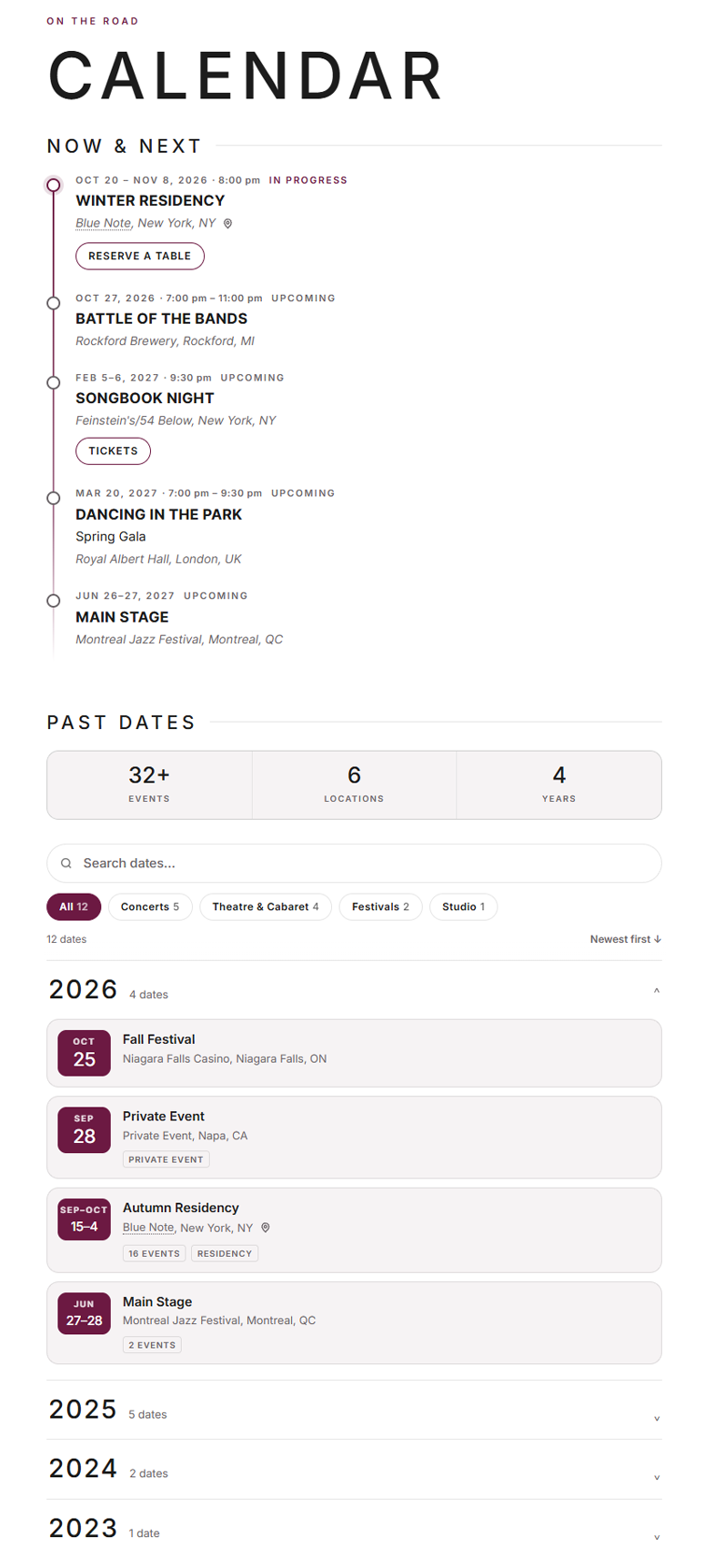
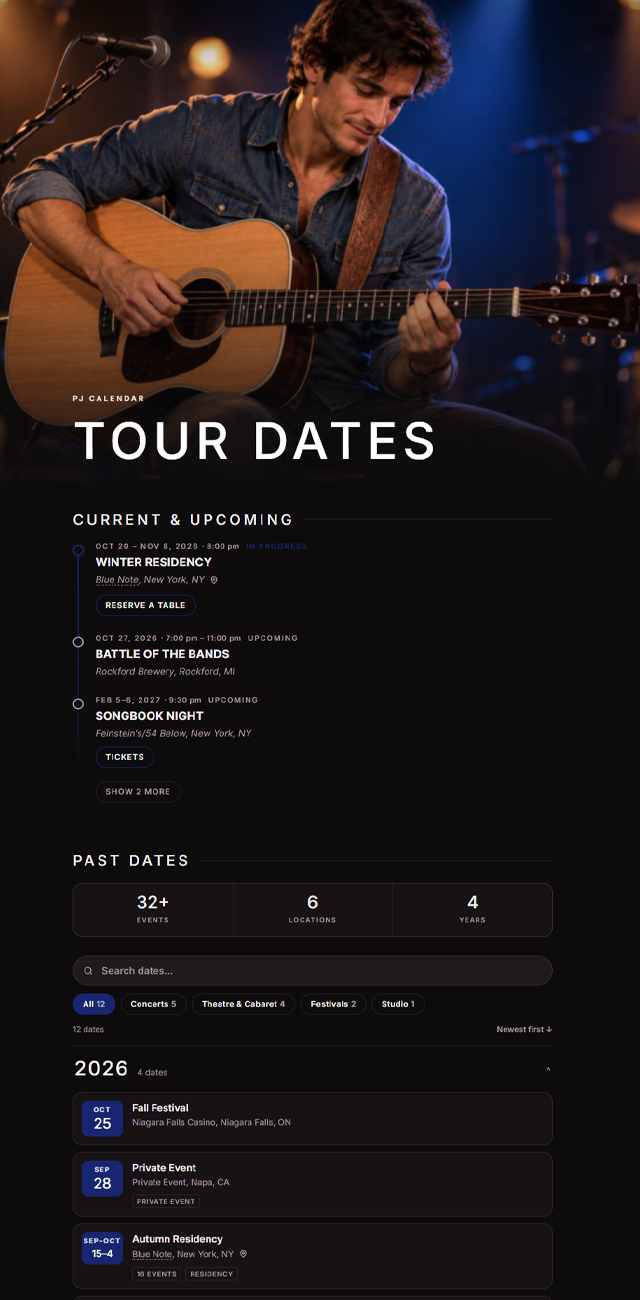
Live demo
Search, filter, open a year.
This is the actual plugin running on this page, not a screenshot. Upcoming dates on top, past dates grouped by year below, sorted by today's date in your browser. Tap a venue name for its website, or the pin for a map.
Calendar
Now & Next
Past dates
This demo uses the dark scheme with a Pro custom accent. The free plugin includes both the light and dark schemes and six accent presets.
Features
Every date, exactly where visitors expect it.
Upcoming, past and everything in between — all included in the free plugin.
Upcoming and past, sorted for you
Current & Upcoming on top, Past below. The split happens by date, in the browser, so it stays right under page caching — no cron job, no moving dates between categories.
Venues, times & categories
Save a venue once — city, state, address, website — and pick it from a list next time. On the calendar the venue name links to its website, and a street address earns a map pin that opens Google Maps. Dates can be all-day or timed, with projects kept separate from events.
Search, filters & year groups
Visitors search with highlighted matches, filter by category chip, flip the sort order and open past years one at a time. Long upcoming list? Cap it, and the rest wait behind a “Show more” button. Live stats — dates, locations, years — count themselves.
Your own wording
Call them performances, shows, classes or games. Set the titles, headings, stat labels and empty-state text once — or per page: [pjcal eyebrow="On tour" title="Dates" open_years="2"].
Works anywhere
One shortcode, any theme, any page builder. Add a hero photo for a sticky two-column layout, go full-bleed, show only upcoming or only past, or put one calendar per category on a page.
Light and private
One stylesheet, one script, typography inherited from your theme. No fonts or scripts from outside servers, no visitor data collected — and your cache is purged automatically when you save a date.
Simple controls. Professional results.
One settings page under Settings → PJ Calendar. Pick a scheme and an accent and you're done — or unlock Pro and make it yours.
- Light or dark scheme, six accent presets: wine, coral, pink, ocean, forest, slate
- Any brand color, plus background, card and text colorsPro
- Your own heading & body fontsPro
- Add to calendar: Google link + .ics download on every upcoming date, venue address includedPro
- CSV import & export of all your dates and venuesPro
- Compact “next dates” list for sidebars and footersPro

Pricing
Free to use.
Pro to make it yours.
The full calendar is free. Pro adds your colors and fonts, Add-to-calendar links and CSV import — one payment, one site, no subscription.
PJ Calendar
Free
Everything you need to publish your dates. No account, no limits, no watermark.
- Upcoming & past dates sorted automatically
- Venues with map pins & website links, times, categories
- Search, filters, year groups, live stats & “Show more” limit
- Hero photo, full-bleed and per-page shortcode options
- Light or dark scheme, six accent presets
- Updates via WordPress.org
GPL licensed · works with any theme
PJ Calendar
Pro
With code HALFOFF at checkout. Requires the free plugin.
- Everything in Free, plus:
- Any brand color, plus background, card & text colors
- Your own heading & body fonts
- Add to calendar: Google link + .ics on every upcoming date
- CSV import & export of dates and venues
- Compact “next dates” list for sidebars and footers
- Automatic updates in your dashboard
- Priority support
Use code HALFOFF at checkout
Instant download30-day money-back guaranteeLifetime updates & support
Free vs. Pro
Which one do you need?
The calendar is identical in both. Pro is for sites that want it in their own colors and fonts, with Add-to-calendar links and CSV import.
| Feature | Free | Pro |
|---|---|---|
| Calendar | ||
| Upcoming & past dates sorted automatically by date | ✓ | ✓ |
| Venues with website links & map pins, start & end times, all-day dates | ✓ | ✓ |
| Categories, with projects kept separate from events | ✓ | ✓ |
| Search, category filters, sort toggle, year groups & live stats | ✓ | ✓ |
| “Show more” limit for long upcoming lists | ✓ | ✓ |
| Shortcode with per-page options; hero photo & full-bleed layouts | ✓ | ✓ |
| Your own wording: count noun, headings, stat labels | ✓ | ✓ |
| Design | ||
| Light or dark scheme, six accent presets | ✓ | ✓ |
| Any brand color, plus background, card & text colors | — | ✓ |
| Your own heading & body fonts | — | ✓ |
| Pro tools | ||
| Add to calendar: Google link + .ics with the venue address, on every upcoming date | — | ✓ |
| CSV import & export of all your dates and venues | — | ✓ |
| Compact “next dates” list for sidebars and footers | — | ✓ |
| Updates & support | ||
| Updates | via WordPress.org | Automatic, in your dashboard |
| Priority support | — | ✓ |
| Price | $0 | $7 one-time, per site |
Pro is an add-on and requires the free plugin.
Using the calendar
How does it know which dates are upcoming and which are past?
By the date itself. When the page loads, the calendar sorts each date into Current & Upcoming or Past in the visitor's browser — so a date moves on its own at midnight, even on sites with page caching, and you never have to re-file anything. The admin shows the same split: a Status column, Upcoming / Past views and a filter.
Will it slow down my website?
No. The plugin loads one stylesheet and one script, nothing from outside servers, and typography comes from your theme. When you save a date it also clears the page cache for you if you use W3 Total Cache, WP Super Cache or WP Rocket.
Does it collect any visitor data?
None. Searching and filtering happen in the browser; nothing is stored or sent anywhere. Even the Pro Add to calendar links are built in the browser, so there's no tracking, no cookies and no account.
Does it work with my theme and page builder?
Yes. Drop the [pjcal] shortcode into any page or any builder that accepts shortcodes — Elementor, Divi, Beaver Builder, Cornerstone, WPBakery and the rest. The layout adapts to whatever width it's given, and the light or dark scheme sits comfortably on either kind of site.
Can I show only upcoming dates, or one category?
Yes. [pjcal show="upcoming"] shows just the upcoming list (or show="past" for an archive page). category="tour" limits a calendar to one category, and category="tour,studio" prints one calendar per category on the same page. For a long upcoming list, now_limit="5" shows five dates and puts the rest behind a “Show more” button.
Can I call them performances, shows or classes instead of events?
Yes. Under Settings → PJ Calendar you set the count noun (singular and plural), both stat labels, the section titles and the empty-state text. Any of them can also be overridden per page as a shortcode attribute — [pjcal eyebrow="On tour" now_title="Next up" past_title="Where we've been"].
Can I add a photo, or make it full width?
Both. image="123" (a media ID or a URL) adds a hero photo that sticks beside the list as the visitor scrolls; fullbleed="yes" lets the calendar break out of a narrow content column. If your theme has a fixed header, one line of CSS — .pjcal{--pjcal-top:90px} — keeps the sticky photo clear of it.
How do venues and times work?
Enter a venue once — name, city, state, address, website — and pick it from a list for every date after that; a date's city and state fall back to the venue's automatically, and a venue typed in while adding a date is saved with that date's city and state. On the calendar the venue name links to its website, and a venue with a street address gets a small map pin that opens Google Maps in a new tab — no map embed, no API key. Dates are all-day by default; untick the box to add a start and end time, shown in your site's time format.
Pro & licensing
What does Pro add, exactly?
Any brand color plus custom background, card and text colors; your own heading and body fonts; an Add to calendar link (Google and .ics, with the venue's address) under every upcoming date; CSV import and export of dates and venues; the compact [pjcal_next] list for sidebars and footers; automatic updates in your dashboard; and priority support. The calendar itself — the upcoming/past split, venues, times, search, filters, stats, both schemes and all six accents — is fully included in the free version.
Do I need the free plugin to use Pro?
Yes. Pro is an add-on: install the free plugin from WordPress.org first, then install Pro and enter your license key under Settings → PJ Calendar.
Can I import the dates I already have?
With Pro, yes. Calendar → Import / Export takes a CSV with columns for title, event, start and end dates, times, venue, venue address, venue website, city, state, category, link and a few flags. Common header names like Venue, Start Date or Performances are recognised; categories and venues are created if they don't exist yet (with their address and website when the file has them), and rows that are already in the calendar are skipped. Export works the other way, so a spreadsheet stays a reliable backup.
How does the license work?
One license covers one website, with a single one-time payment — no subscription. Activate it on the settings page; if you move to a new domain, click Deactivate on the old site and activate on the new one. Your key is shown on the order confirmation and in your receipt email.
Will it stop working if my license expires?
Licenses don't expire. If a license is ever deactivated, the Pro settings simply pause and the calendar carries on with the free plugin's scheme and accent presets — nothing on your site breaks, and your Pro settings are kept for when you reactivate.
Do I need coding knowledge?
No. Everything is a setting or a shortcode attribute, and the Shortcodes tab under Settings → PJ Calendar lists every attribute with a copy-and-paste example. If you can add a shortcode to a page, you can add the calendar.
What if it's not for me?
Pro comes with a 30-day money-back guarantee — email support and we'll refund it, no questions asked. The free plugin is, well, free.
Your dates, sorted.
Add the calendar to your site in a couple of minutes. Start free, and upgrade only if you want it in your own colors and fonts, with Add-to-calendar links and CSV import.
30-day money-back guarantee on Pro.