
WordPress plugin · from PureJeannius
PJ Mortgage Tools
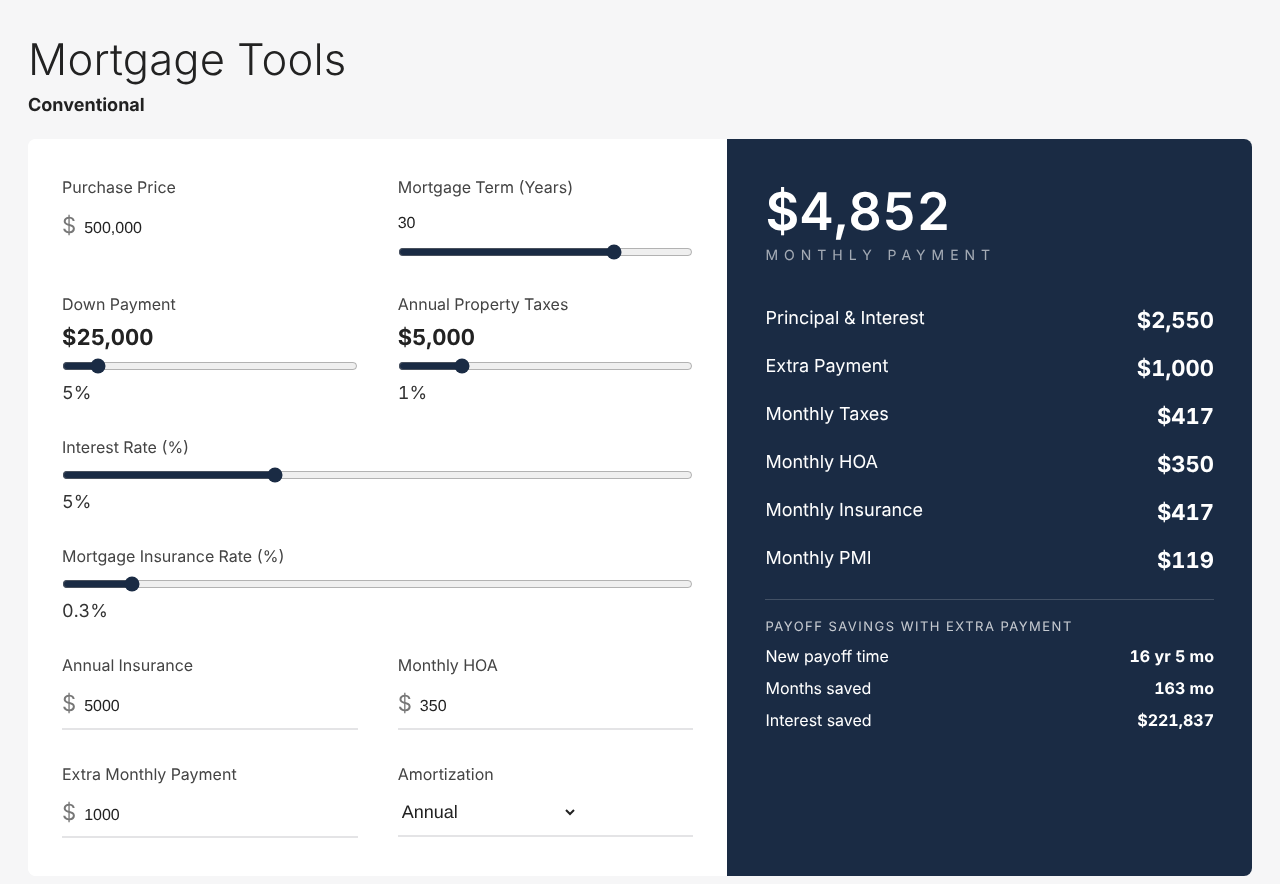
A fast, modern mortgage calculator for real-estate and lending sites. Visitors adjust the numbers; the payment, payoff date and amortization update instantly.
- Live monthly payment with taxes, insurance, HOA & PMI
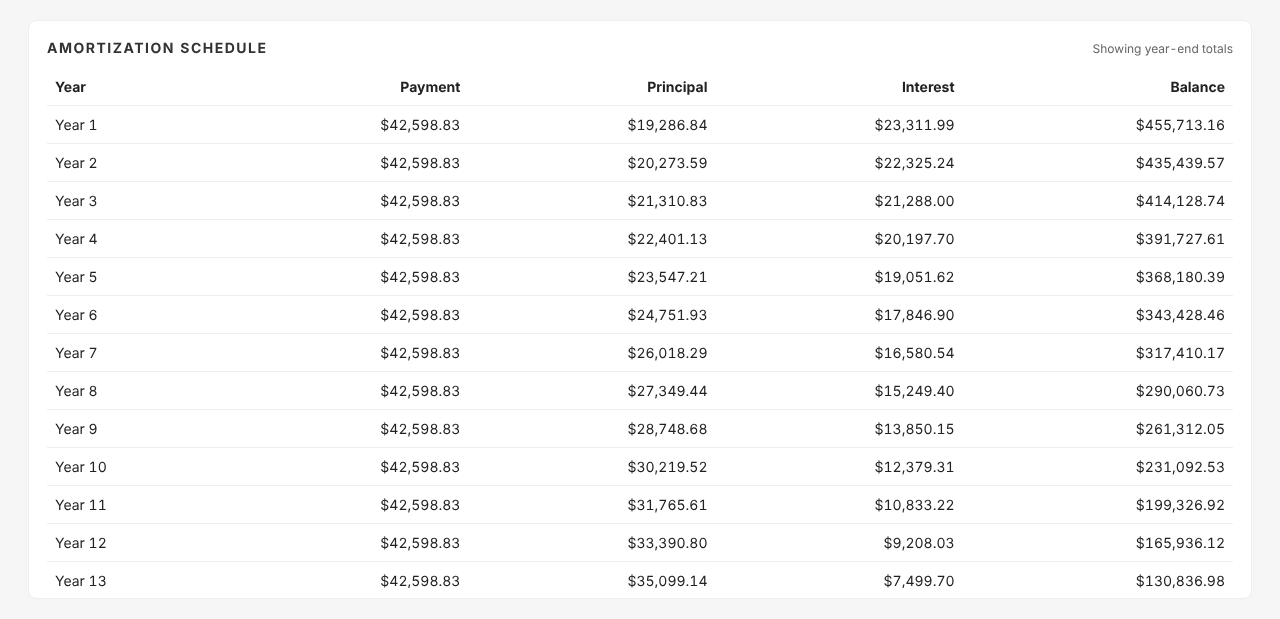
- Amortization schedule, by year or by month
- Extra-payment payoff analysis & interest saved
- Brand colors, custom defaults & display controlsPro
Live demo
Go ahead — move the sliders.
This is the actual plugin running on this page, not a screenshot. Change anything; the payment, payoff date and schedule update as you go.
This demo uses a Pro custom color. The free plugin includes Navy, Dark Gray and Purple presets.
Features
Everything a buyer wants to know, on one screen.
Fast, accurate, and all included in the free plugin.
Live payment breakdown
Principal & interest, taxes, insurance, HOA and PMI update the moment a visitor moves a slider. No submit button, no page reload.
Amortization schedule
Year-by-year or month-by-month: payment, principal, interest and remaining balance across the life of the loan.
Extra-payment payoff analysis
Add a monthly amount and see the new payoff date, months saved and total interest saved — the numbers that turn browsers into buyers.
Your own starting values
Pre-fill price, rate, term, down payment, taxes, insurance and HOA for your market — [pjmcalc price="450000" rate="6.25"] — or set them in the block sidebar.
Works anywhere
Shortcode or Gutenberg block, any theme, any page builder. Adapts to the width it's given, stacks on phones, and prints cleanly.
Light and private
One stylesheet, one script, loaded only on pages with a calculator. All math runs in the browser — no external requests, no visitor data collected.
Simple controls. Professional results.
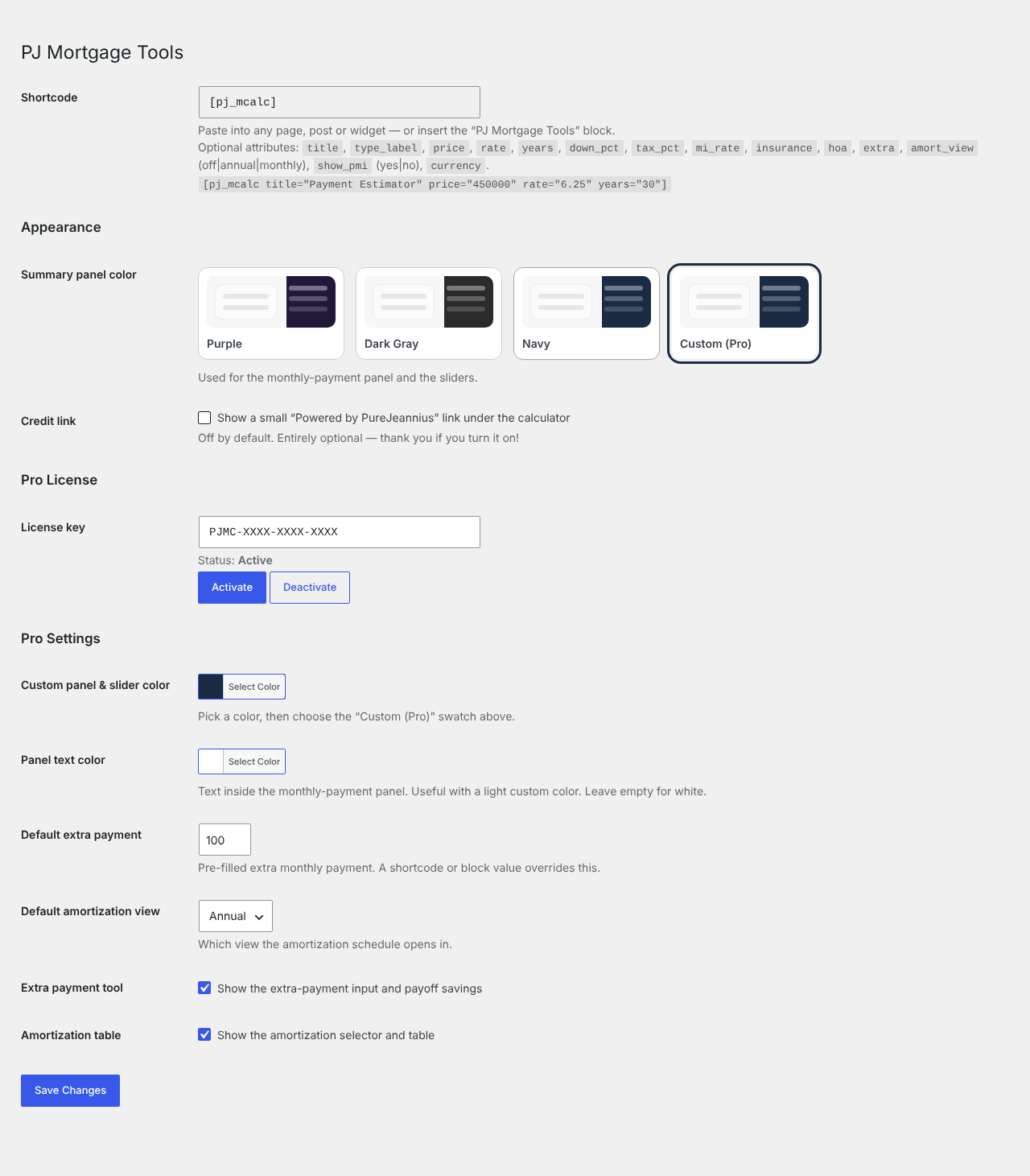
One settings page under Settings → Mortgage Tools. Pick a color preset and you're done — or unlock Pro and make it yours.
- Navy, Dark Gray or Purple preset for the payment panel and sliders
- Any brand color with a color pickerPro
- Custom text color for the payment panelPro
- Site-wide default extra payment & amortization viewPro
- Show or hide the extra-payment tool and the amortization tablePro
Pricing
Free to use.
Pro to make it yours.
The full calculator is free. Pro adds brand colors, defaults and display controls — one payment, one site, no subscription.
PJ Mortgage Tools
Free
Everything a visitor needs to run the numbers. No account, no limits, no watermark.
- Live monthly payment with taxes, insurance, HOA & PMI
- Amortization schedule, by year or by month
- Extra-payment payoff analysis & interest saved
- Shortcode & Gutenberg block
- Three color presets
- Updates via WordPress.org
GPL licensed · works with any theme
PJ Mortgage Tools
Pro
With code HALFOFF at checkout. Requires the free plugin.
- Everything in Free, plus:
- Any brand color with a color picker
- Custom text color for the payment panel
- Site-wide default extra payment & amortization view
- Show / hide the extra-payment tool and amortization table
- Automatic updates in your dashboard
- Priority support
Use code HALFOFF at checkout
Instant download30-day money-back guaranteeLifetime updates & support
Free vs. Pro
Which one do you need?
The calculator is identical in both. Pro is for sites that want it in their own colors, with their own defaults.
| Feature | Free | Pro |
|---|---|---|
| Calculator | ||
| Live monthly payment with taxes, insurance, HOA & PMI | ✓ | ✓ |
| Amortization schedule (by year or by month) | ✓ | ✓ |
| Extra-payment payoff analysis & interest saved | ✓ | ✓ |
| Shortcode & Gutenberg block, with starting-value options | ✓ | ✓ |
| Responsive & print-friendly layout | ✓ | ✓ |
| Customization | ||
| Color presets (Navy, Dark Gray, Purple) | ✓ | ✓ |
| Any brand color with a color picker | — | ✓ |
| Custom text color for the payment panel | — | ✓ |
| Site-wide default extra payment & amortization view | — | ✓ |
| Show / hide the extra-payment tool and amortization table | — | ✓ |
| Updates & support | ||
| Updates | via WordPress.org | Automatic, in your dashboard |
| Priority support | — | ✓ |
| Price | $0 | $7 one-time, per site |
Pro is an add-on and requires the free plugin.
Using the calculator
Will it slow down my website?
No. All of the math runs in the visitor's browser, there are no external requests, and the plugin's one stylesheet and one script load only on pages that actually contain a calculator.
Does it collect any visitor data?
None. Nothing a visitor types is stored or sent anywhere — not to your server, not to ours. There's no tracking, no cookies and no account, which keeps you clear of consent-banner territory for this feature.
Does it work with my theme and page builder?
Yes. Use the PJ Mortgage Tools block in the WordPress editor, or drop the [pjmcalc] shortcode into any builder that accepts shortcodes — Elementor, Divi, Beaver Builder, Cornerstone, WPBakery and the rest. The layout adapts to whatever width it's given, including narrow sidebars and phones.
Can I set my own starting values?
Yes. Pass them as shortcode attributes — for example [pjmcalc price="450000" rate="6.25" years="30" down_pct="10"] — or set them in the block sidebar. You can also set the title, a subtitle, taxes, insurance, HOA, the mortgage-insurance rate, and whether the PMI control shows at all.
Is the math accurate?
Principal and interest use the standard fixed-rate amortization formula lenders use. Taxes are a percentage of the purchase price, insurance and HOA are entered directly, and PMI is applied only while the down payment is below 20%. Figures are an estimate for illustration — they don't include lender fees, points or local tax rules, so buyers should confirm with a lender.
Can I use it outside the US, or change the currency?
Yes. Add currency="CAD" (or any ISO currency code) and amounts are formatted for that currency. The underlying math is the same everywhere.
Can I put more than one calculator on a page?
Yes — each shortcode or block is independent, so you could show a conventional and an FHA scenario side by side with different starting values.
Pro & licensing
What does Pro add, exactly?
Customization. Any brand color via a color picker, a custom text color for the payment panel, a site-wide default extra payment and amortization view, the option to hide the extra-payment tool or the amortization table, automatic updates in your dashboard, and priority support. The calculator itself — including amortization and extra-payment analysis — is fully included in the free version.
Do I need the free plugin to use Pro?
Yes. Pro is an add-on: install the free plugin from WordPress.org first, then install Pro and enter your license key under Settings → Mortgage Tools.
How does the license work?
One license covers one website, with a single one-time payment — no subscription. Activate it on the settings page; if you move to a new domain, click Deactivate on the old site and activate on the new one. Your key is shown on the order confirmation and in your receipt email.
Will it stop working if my license expires?
Licenses don't expire. If a license is ever deactivated, the Pro settings simply pause and the calculator carries on with the free plugin's presets — nothing on your site breaks.
Do I need coding knowledge?
No. Everything is a setting or a shortcode attribute. If you can add a block to a page, you can add the calculator.
What if it's not for me?
Pro comes with a 30-day money-back guarantee — email support and we'll refund it, no questions asked. The free plugin is, well, free.
Ready when you are.
Add the calculator to your site in a couple of minutes. Start free, and upgrade only if you want it in your own colors.
30-day money-back guarantee on Pro.