
WordPress plugin · from PureJeannius
PJ PageNotes
Client website reviews without the email chains. Your client clicks anything on the dev site and leaves a sticky note right on it; you reply, track every note and get each page approved, all inside WordPress.
- Click any element, or the whole page, and leave a note right there
- Private review links with no account needed, or Client Reviewer logins
- Replies, Open / In progress / Resolved, and one-click page approval
- Notes stay on their element when the layout changes, and it works on phones
- ProBefore & after screenshots, file attachments, change requests & a sign-off report
Works with any theme · no outside service — notes stay on your site
Features
Feedback your clients can actually give.
Point, click, comment, approve — everything a client review needs is in the free plugin.
Notes right on the page
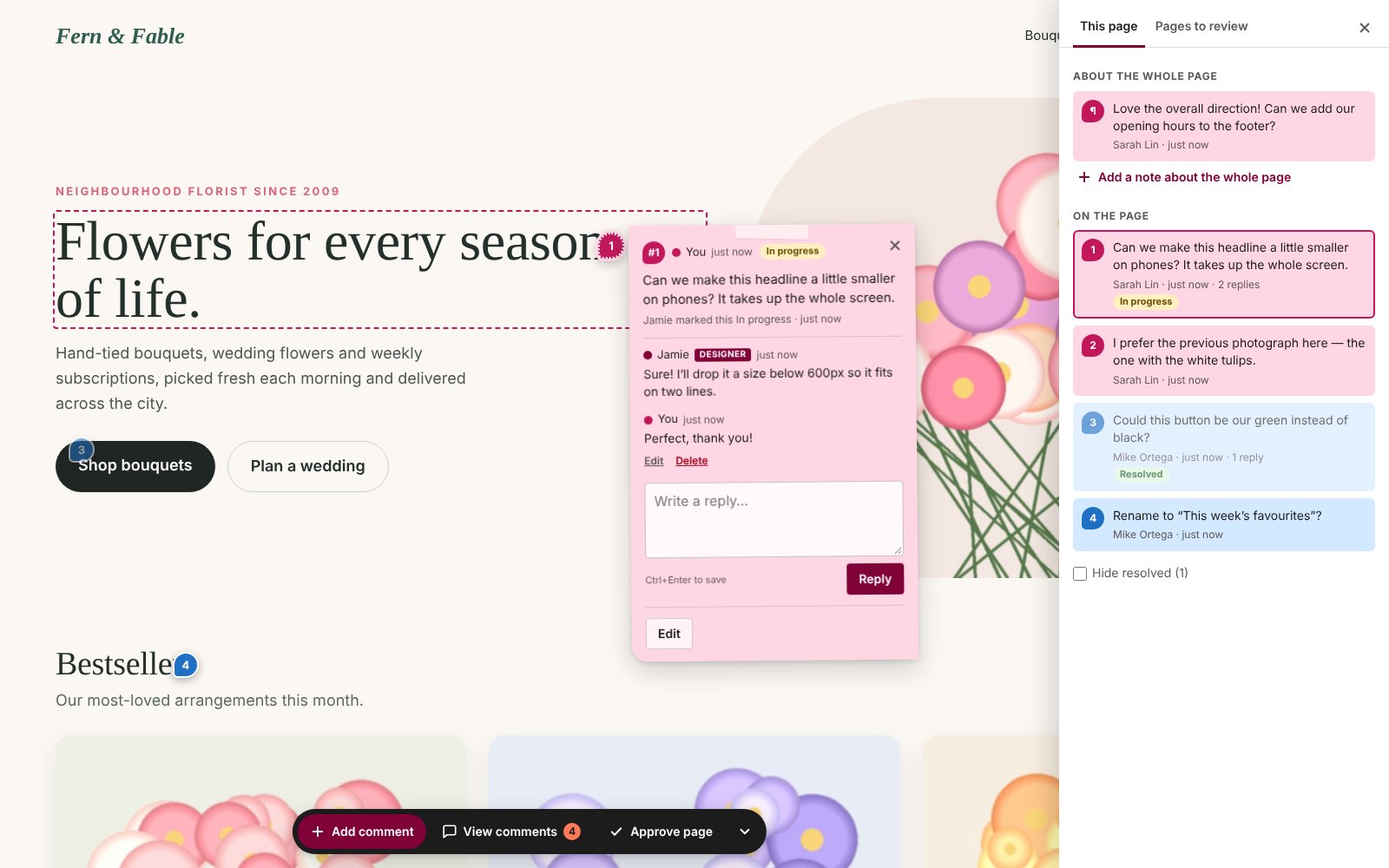
Your client clicks Add comment, sees each element highlight as they hover, and clicks to pin a sticky note right there — a link or button under the click won’t navigate away. Or they leave a note about the whole page. On a phone they tap, and the note opens as a bottom sheet.
Notes that stay put
Each note remembers its element by position, text, classes and image file name, so it re-attaches when you add sections above it, edit its wording or move blocks around. If the spot is truly gone, the note says so instead of guessing.
No account needed
Invite a client by name and email and they get a styled invitation with a private link that can expire after 7, 30 or 90 days. Prefer passwords? The Client Reviewer role logs straight in to the site, never the dashboard. Every reviewer gets their own color.
Replies, statuses & approval
Reply inside each note, move it from Open to In progress to Resolved, and let your client click Approve page when it’s done. Edit the page after it’s approved and you’ll both see it flagged, with the Approve button back for a second look.
One dashboard for every note
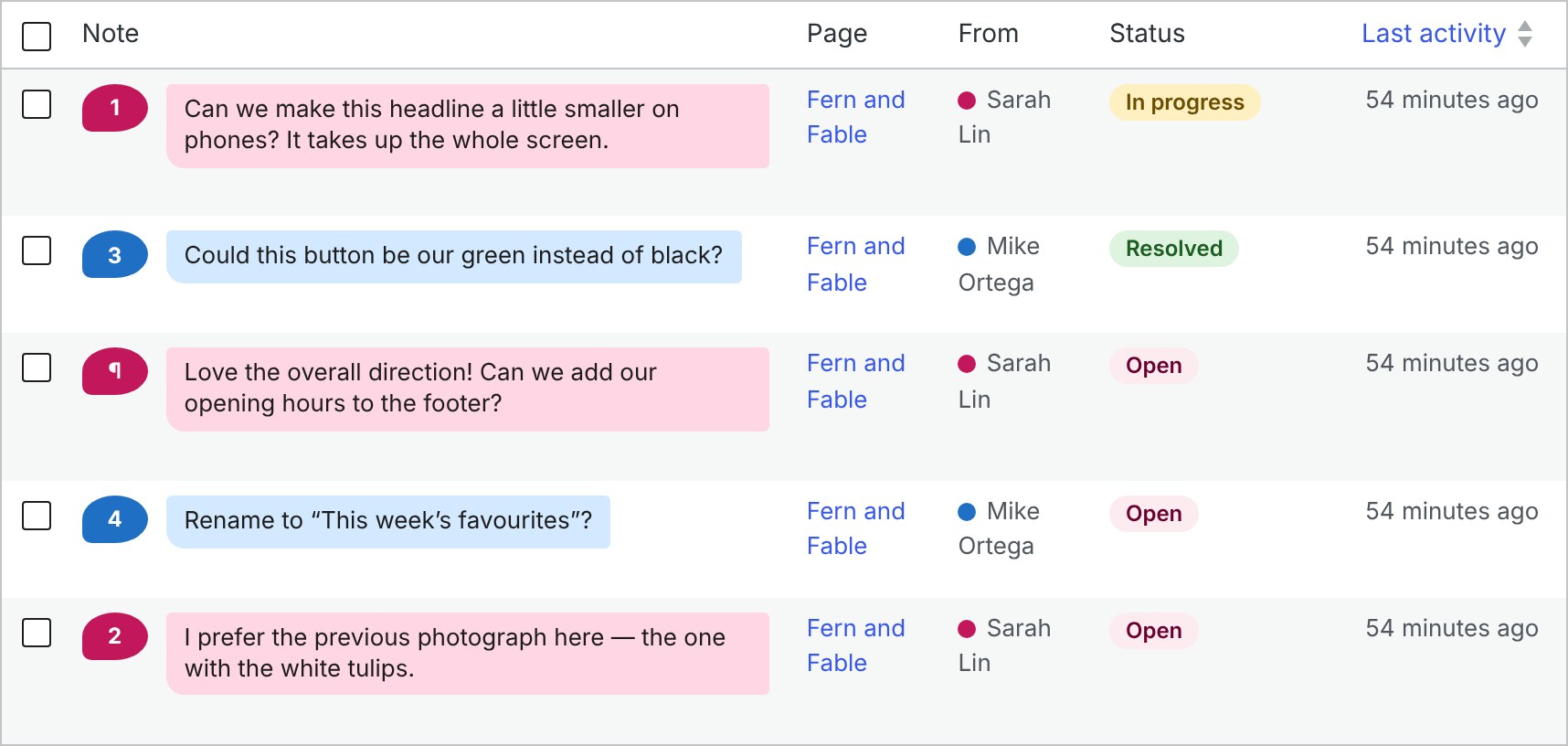
PageNotes → Feedback lists every note across the site: filter by page, reviewer or status, search, resolve in bulk and reply without leaving the screen. Pages in review shows the counts and approvals for each page, and email keeps everyone posted.
A private review site
Turn on Private review site and everyone but you and your reviewers sees a “coming soon” page, search engines are asked to stay out, and the public REST API and feeds close. Review links are stored only as a secure hash and can be turned off any time.
PJ PageNotes Pro
From first note to final sign‑off.
Pro adds the paper trail to every review: a picture of each note, the files clients send, paid change requests they approve on the page, and a report that closes the project — all inside the notes your clients already use.
Before & after screenshots
Every note saves a picture of the spot the client clicked, outlined in their color. When you resolve it, an “after” shot is taken too — so the note shows When noted and After the fix side by side.
automatic
Change requests
Out-of-scope ask? Attach a price or hours, plus any extra time it needs. The client approves or declines right on the note, and every step is logged and emailed.
+ Change request
Sign-off report
Choose the pages and print a clean report: every note with its screenshots and conversation, change-request totals and signature lines. Save it as a PDF from the browser, or download a CSV.
PageNotes → Sign-off report
Attachments
A paperclip in every note and reply — for clients too. Logos, photos, PDFs and spreadsheets arrive where the feedback is; images open in a lightbox.
notes & replies
Private files
Screenshots and uploads stay out of the Media Library and off public URLs. Only you and the reviewers on that page can open them.
designers & reviewers only
Dashboard at a glance
A Pro column on the Feedback screen shows which notes have screenshots, files or a change request — with the amount and whether the client has approved it.
PageNotes → Feedback
One note, start to finishThe client's note with its screenshot, your reply, the after shot once it's fixed, and a change request approved by client.
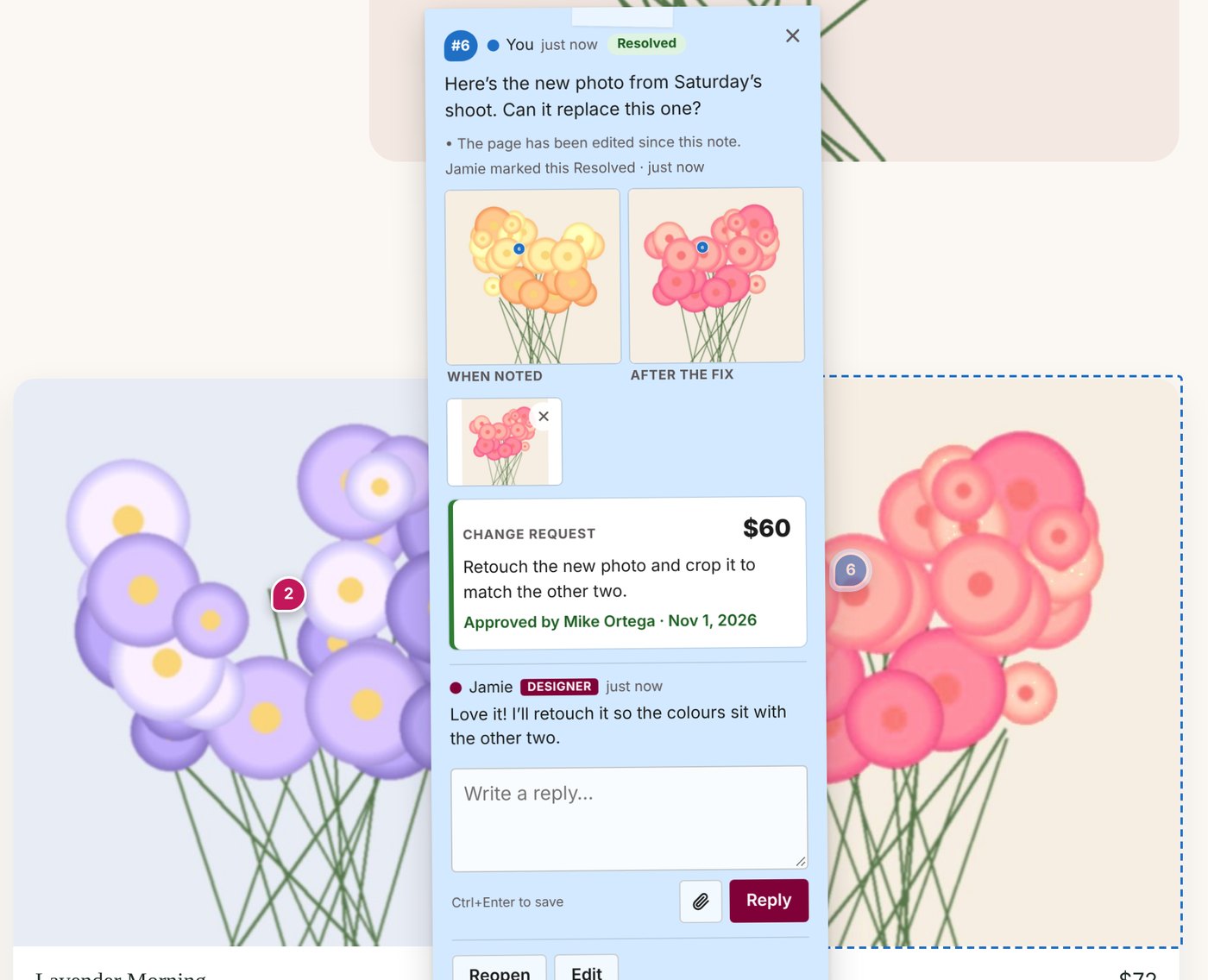
Sample site and client. Screenshots are taken in the reviewer's browser, at their screen size.
Pricing
Free to review.
Pro to sign it off.
The full review tool is free. Pro adds screenshots, attachments, change requests and a sign-off report — one payment, one site, no subscription.
PJ PageNotes
Free
Everything you need to run a client review. No account, no limits on pages, notes or reviewers.
- Sticky notes on any element, or about the whole page
- Private review links & Client Reviewer logins
- Replies, statuses & one-click page approval
- Feedback dashboard with filters, search & bulk actions
- Email notifications & styled client invitations
- Optional private review site, hidden from visitors & search engines
- Updates via WordPress.org
GPL licensed · works with any theme
PJ PageNotes
Pro
With code HALFOFF at checkout. Requires the free plugin.
- Everything in Free, plus:
- Automatic screenshot with every note, plus an “after” shot when it’s fixed
- File attachments on notes & replies, stored privately
- Change requests with a price or hours, approved by your client
- Printable sign-off report (save as PDF) & CSV export
- Automatic updates in your dashboard
- Priority support
Code HALFOFF applied at checkout
Instant download30-day money-back guaranteeLifetime updates & support
Free vs. Pro
Which one do you need?
The review tool is identical in both. Pro is for studios that want screenshots, files and change requests on every note, and a report to close the project.
| Feature | Free | Pro |
|---|---|---|
| Reviewing | ||
| Click any element and leave a note right on it | ✓ | ✓ |
| Notes about the whole page | ✓ | ✓ |
| Private review links — no account needed, optional expiry | ✓ | ✓ |
| Client Reviewer logins for clients who prefer a password | ✓ | ✓ |
| Each reviewer in their own color | ✓ | ✓ |
| Works on phones and tablets (tap to place a note) | ✓ | ✓ |
| Notes stay on their element when the layout or text changes | ✓ | ✓ |
| Clients can edit their own notes and replies | ✓ | ✓ |
| Managing feedback | ||
| Replies, plus Open / In progress / Resolved | ✓ | ✓ |
| One-click page approval, flagged if the page changes afterwards | ✓ | ✓ |
| Feedback dashboard with filters, search & bulk actions | ✓ | ✓ |
| Pages in review at a glance, with counts per status | ✓ | ✓ |
| Email notifications & styled client invitations | ✓ | ✓ |
| Hide notes while you work, from the admin bar | ✓ | ✓ |
| Privacy | ||
| Private review site: visitors see a “coming soon” page, search engines stay out | ✓ | ✓ |
| Review links can be replaced or turned off at any time | ✓ | ✓ |
| Works with page caches (WP Fastest Cache, WP Rocket, W3 Total Cache, WP Super Cache) | ✓ | ✓ |
| Pro tools | ||
| Automatic screenshot with every note, plus an “after” shot when it’s fixed | — | ✓ |
| File attachments on notes & replies, stored privately | — | ✓ |
| Change requests with a price or hours, approved or declined by your client | — | ✓ |
| Printable sign-off report (save as PDF) & CSV export | — | ✓ |
| Updates & support | ||
| Updates | via WordPress.org | Automatic, in your dashboard |
| Priority support | — | ✓ |
| Price | $0 | 50% off launch price |
Pro is an add-on and requires the free plugin.
Running a review
Does my client need a WordPress account?
No. Send them a private review link: opening it lets them comment on the pages you’ve opened for review, nothing else. If a client would rather have a password, give them the Client Reviewer role — they log in straight to the site with the review toolbar, and never see the dashboard.
How do I invite a client?
Under PageNotes → Reviewers & links, enter their name and email, pick a color and how long the link should last (7, 30 or 90 days, or no expiry), and click Create review link. Email it from there — with a personal message, and a preview before it goes — or copy it and send it yourself. You can choose which page the link opens on.
Which pages can be reviewed?
Any published page or post you open for review: one at a time from the Review column on the Pages screen or the PageNotes menu in the admin bar, or the whole site at once under Settings. Notes only work on published pages, so on a development site, publish the pages and turn on Private review site to keep them out of public view.
What happens to notes when I change the page?
They follow their element. Each note re-finds the element it was left on, even after you add sections above it, edit its text or move blocks. If the element is gone, the pin moves to its old spot with a dashed outline and the note says “The original spot changed”. Notes on hidden elements, like a closed menu or another slide, are listed as “Not visible right now”, and notes and approvals show when the page has been edited since.
Can visitors see the notes, or the development site?
Notes are only ever shown to you and your reviewers; they load separately from the page and are never stored in a page cache. With Private review site on, everyone else gets a “coming soon” page, search engines are asked not to index it, and the public REST API and feeds are closed. One limit: files in the Media Library are served directly by the web server, so someone who already has a file’s address can still open it.
Does it work with caching plugins, Sucuri or a CDN?
Yes. Notes and review data never end up in a cached page, and opening or closing a page for review clears WP Fastest Cache, W3 Total Cache, WP Super Cache and WP Rocket for you. If you use Sucuri or another CDN, purge it there after opening a page for review or turning the private site on or off.
Does it work on phones and tablets?
Yes. Reviewers tap to place a note, and notes and the comment list open as a bottom sheet. A review link is remembered per browser, so a client switching from laptop to phone just opens the link again on the phone.
Will it slow down my site?
No. Pages that aren’t in review are untouched. On pages in review, one small script stays idle unless you or a reviewer is looking, and all notes load only for them. Nothing comes from outside servers — no fonts, no tracking, no third-party service — and every note stays in your own WordPress database.
Pro & licensing
What does Pro add, exactly?
An automatic screenshot of the spot with every note, plus an “after” shot when it’s resolved; file attachments on notes and replies; change requests with a price or hours that your client approves or declines; a printable sign-off report and CSV export; automatic updates in your dashboard; and priority support. The review tool itself — notes, links, replies, statuses, approvals, the dashboard, emails and the private review site — is fully included in the free version.
How are the screenshots taken?
In the reviewer’s own browser, at their screen size, the moment they save a note: the area around the element is captured with the numbered pin drawn on it. When you mark the note resolved, the same area is captured again, so you get When noted and After the fix side by side. Images from other domains and embeds such as YouTube or Google Maps can come out blank, and notes about the whole page don’t get a screenshot.
Are attachments private?
Yes. Files go into a private folder with unguessable names and are only served to you and to reviewers of that page — never by a direct link. You set the size limit (10 MB by default) and the file types allowed; SVG, HTML and script files are always refused. On Nginx servers, which ignore .htaccess, files stay protected by their names, and one server rule adds a second lock.
How do change requests work?
On any note, click + Change request, describe the extra work and add a price or a number of hours, then send it. Your client sees it on the note with Approve and Decline (with an optional comment), and you get an email either way. Every step is logged with the name and time for the sign-off report.
What’s in the sign-off report?
A cover page with the project and client, a summary of open, in-progress and resolved notes and the approvals for each page, a table of change requests with approved and pending totals, then every note with its screenshots, files and conversation, and signature lines. It opens in a new tab ready to print or save as PDF. The same data downloads as a CSV for Excel.
Do I need the free plugin to use Pro?
Yes. Pro is an add-on: install the free PJ PageNotes plugin first, then install Pro and enter your license key under PageNotes → Pro settings.
How does the license work?
One license covers one website, with a single one-time payment — no subscription. Activate it on the Pro settings page; when a development site moves to its live domain, click Deactivate on the old address and activate on the new one. Your key is shown on the order confirmation and in your receipt email.
Will anything break if my license is deactivated?
No. Everything already saved — screenshots, files and change requests — stays visible, and clients can still answer change requests you’ve already sent. New screenshots, uploads, change requests and reports pause until you activate again, and the free review tool carries on as normal.
What if it’s not for me?
Pro comes with a 30-day money-back guarantee — email support and we’ll refund it, no questions asked. The free plugin is, well, free.
Feedback, right where it belongs.
Install PageNotes on your dev site and send your client a review link in a couple of minutes. Start free, and upgrade when you want screenshots, attachments, change requests and a sign-off report.
30-day money-back guarantee on Pro.